
HEIC vs WebP: Which Format Should You Use in 2026?
HEIC and WebP are both next-gen formats with very different strengths. Compare compression, quality, and compatibility to find the right one for you.
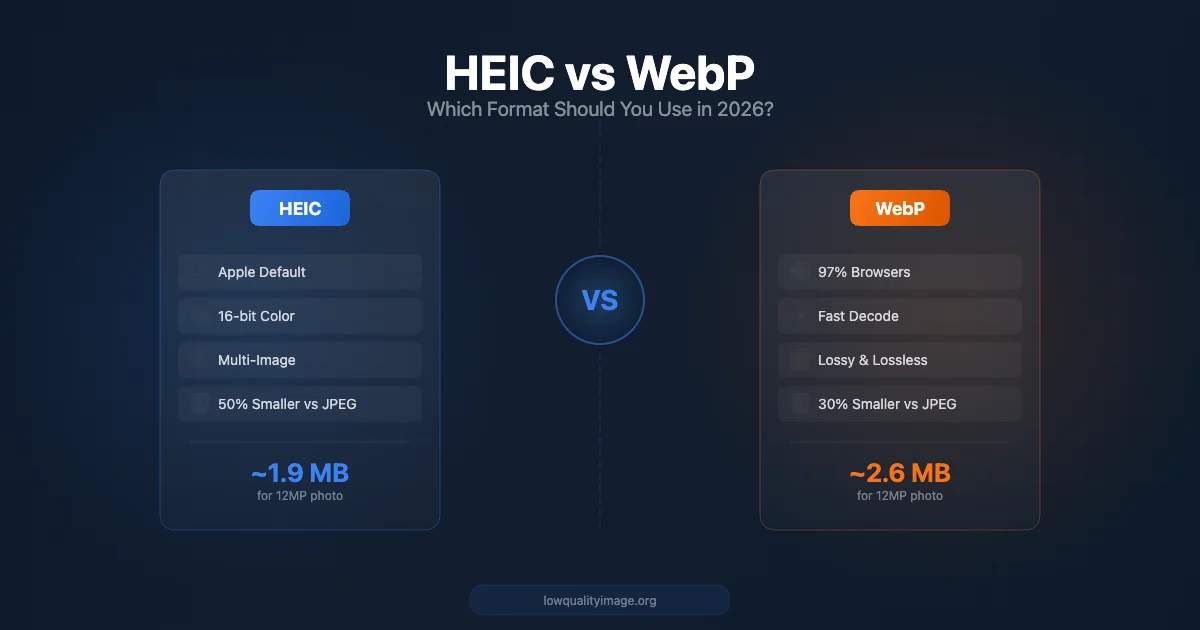
Two next-gen formats, two very different use cases
If you've used an iPhone in the last few years, your photos are stored in HEIC format. If you've optimized images for a website, you've probably heard of WebP. Both are "next-gen" image formats that promise smaller files and better quality than JPEG — but they're designed for very different purposes.
In this guide, we'll break down the real differences between HEIC and WebP, compare them across compression, quality, compatibility, and use cases, and help you decide which format to use — or whether you need to convert between them.
Quick Overview: HEIC vs WebP at a Glance
| Feature | HEIC | WebP |
|---|---|---|
| Developed by | MPEG (adopted by Apple) | |
| Year introduced | 2015 (iOS default since 2017) | 2010 |
| Compression codec | HEVC (H.265) | VP8 (lossy) / VP9-based (lossless) |
| Compression type | Lossy & Lossless | Lossy & Lossless |
| Color depth | Up to 16-bit | 8-bit |
| Transparency | Yes (alpha channel) | Yes (alpha channel) |
| Animation | Yes (image sequences) | Yes |
| Multi-image container | Yes (burst photos, Live Photos) | No |
| Browser support | Safari only | All modern browsers (97%+) |
| Primary use | Device photography storage | Web image delivery |
What is HEIC?
HEIC (High Efficiency Image Container) is based on the HEIF standard and uses the HEVC (H.265) video codec for compression. Apple made it the default photo format on iPhones starting with iOS 11 in 2017.
The format was designed primarily for device-level photography — storing high-quality photos efficiently on phones and cameras. Compared to JPEG, HEIC delivers roughly 50% smaller files at equivalent visual quality. It also supports features that JPEG simply can't match:
- 16-bit color depth — captures more color detail than 8-bit JPEG, especially important for HDR photography
- Multiple images in a single file — burst photos, Live Photos, and depth maps can be stored in one .heic container
- Non-destructive editing metadata — edits are stored as instructions, so the original image data is preserved
- Alpha channel transparency — supports transparent backgrounds, unlike JPEG
What is WebP?
WebP is an image format developed by Google in 2010, designed specifically for the web. It uses VP8 compression (derived from Google's video codec) for lossy mode and a separate algorithm for lossless compression.
WebP's primary goal is to make web images load faster. It achieves 25–35% smaller files than JPEG at comparable quality and 26% smaller files than PNG for lossless images. Key features include:
- Universal browser support — Chrome, Firefox, Safari (16+), Edge, Opera all support WebP natively (97%+ of browsers worldwide)
- Both lossy and lossless modes — use lossy for photos, lossless for graphics and logos
- Alpha channel transparency — works in both lossy and lossless modes (unlike PNG where transparency requires lossless)
- Animation support — a modern replacement for animated GIFs at much smaller file sizes
Compression: How Do They Compare?
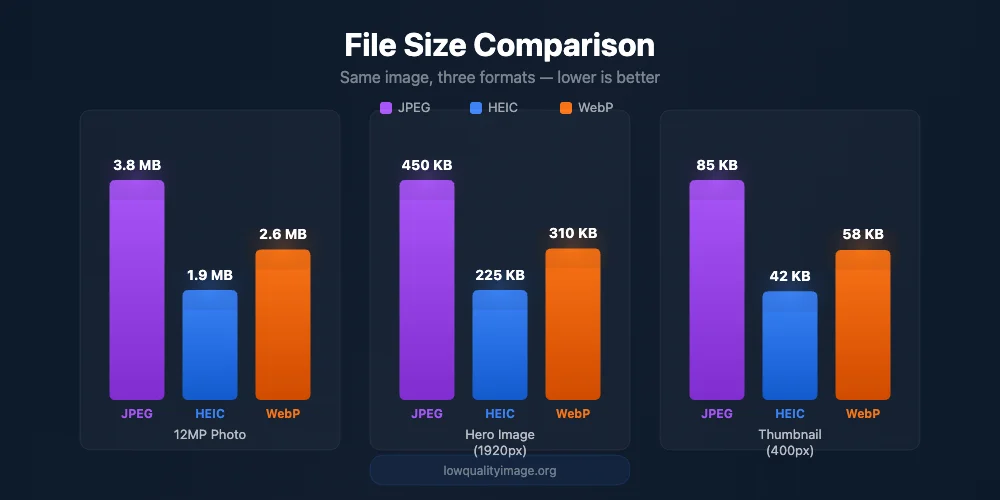
HEIC achieves the smallest file sizes, but WebP offers the best web compatibility
Both formats significantly outperform JPEG, but their compression characteristics differ:
HEIC Compression
HEIC uses HEVC (H.265), one of the most advanced video compression codecs available. Because it leverages inter-frame prediction techniques adapted for still images, HEIC is extremely efficient — often producing files 50% smaller than JPEG at the same visual quality. With 16-bit color depth, it preserves more tonal information in shadows and highlights, making it ideal for photography.
However, HEVC decoding is computationally expensive. On devices without hardware HEVC decoders (many older PCs, Android phones, and Linux systems), opening HEIC files can be slow or require additional software.
WebP Compression
WebP delivers 25–35% smaller files than JPEG for lossy images. While this is less aggressive than HEIC, WebP decoding is significantly faster and more lightweight. This makes it better suited for web delivery, where millions of images need to load quickly across diverse devices and connections.
For lossless compression, WebP produces files about 26% smaller than PNG — making it the best choice for web graphics with transparency.
Real-World File Size Comparison
| Scenario | JPEG | HEIC | WebP |
|---|---|---|---|
| 12MP photo (iPhone) | 3.8 MB | ~1.9 MB | ~2.6 MB |
| Web hero image (1920px) | 450 KB | ~225 KB | ~310 KB |
| Product thumbnail (400px) | 85 KB | ~42 KB | ~58 KB |
Note: Actual sizes vary depending on image content and quality settings. These are typical estimates based on standard compression settings.
Compatibility: The Decisive Factor
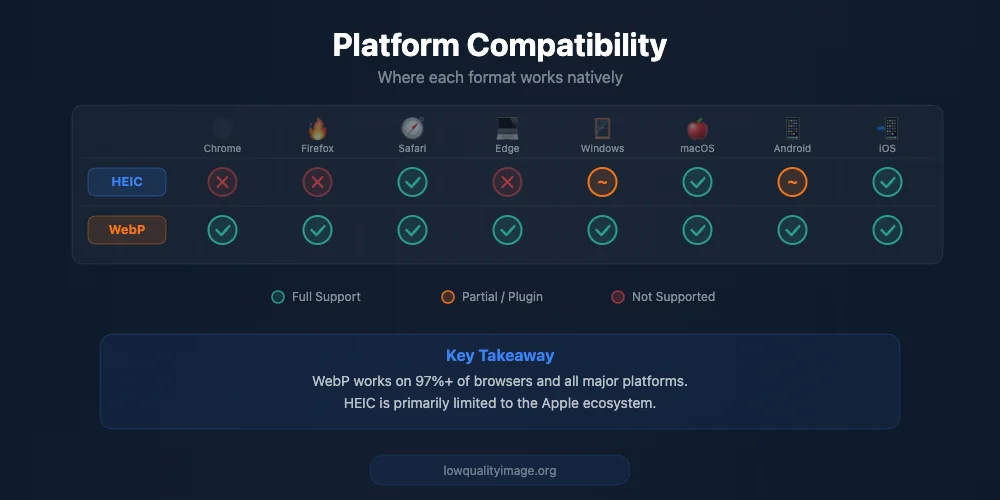
WebP enjoys near-universal support; HEIC is largely Apple-only
This is where the two formats diverge dramatically — and it's often the deciding factor for which one to use.
HEIC Compatibility
- Apple ecosystem: Fully supported on iOS, iPadOS, macOS
- Windows: Requires free HEIF Image Extensions from Microsoft Store (or paid HEVC codec for some operations)
- Android: Supported on Android 10+ for viewing, but most Android cameras don't shoot in HEIC
- Web browsers: Only Safari supports HEIC natively. Chrome, Firefox, and Edge do not support HEIC
- Social media: Most platforms auto-convert HEIC to JPEG on upload
- Email: HEIC attachments often can't be previewed by recipients on non-Apple devices
WebP Compatibility
- All modern browsers: Chrome, Firefox, Safari 16+, Edge, Opera — 97%+ of global browser market share
- Windows: Native support in Windows 10 and later
- macOS/iOS: Supported in Safari 16+ (macOS Ventura / iOS 16, released 2022)
- Android: Supported since Android 4.0 (2011)
- Image editors: Supported in Photoshop, GIMP, Figma, Canva, and most modern tools
- CMS platforms: WordPress, Shopify, Squarespace all support WebP uploads
Bottom line: WebP works almost everywhere. HEIC is primarily an Apple ecosystem format. If you need cross-platform or web compatibility, WebP is the clear winner.
When to Use HEIC
HEIC excels in specific scenarios where its unique advantages matter:
- iPhone photography and storage — HEIC is the default format for a reason. It saves significant storage space on your device while preserving maximum quality with 16-bit color depth.
- Archival and professional photography — The higher color depth and non-destructive editing metadata make HEIC a better archival format than JPEG.
- Apple-to-Apple workflows — If your entire workflow stays within the Apple ecosystem (iCloud, AirDrop, macOS editing), HEIC works seamlessly.
- Live Photos and burst shots — HEIC's container format can store image sequences, depth maps, and video clips in a single file.
When to Use WebP
WebP is the better choice for any scenario involving the web or cross-platform sharing:
- Website images — WebP is the modern standard for web images. Using it improves page load times and Core Web Vitals scores, which directly impacts SEO.
- E-commerce product images — Faster-loading product galleries lead to better user experience and higher conversion rates.
- Email and social media — WebP is widely supported and doesn't require format conversion for most recipients.
- Replacing GIFs — Animated WebP files are dramatically smaller than animated GIFs while looking better.
- Graphics with transparency — WebP supports alpha transparency in both lossy and lossless modes, making it a versatile replacement for PNG.
HEIC to WebP: When and How to Convert
The most common conversion scenario is taking photos shot in HEIC on an iPhone and converting them to WebP for use on a website. This makes sense because:
- You get the storage benefits of HEIC on your phone
- You get the web compatibility benefits of WebP on your site
- The conversion can further reduce file size for web delivery
You can convert HEIC to WebP using our free online tools. The conversion runs entirely in your browser — no file uploads, no server processing, completely private. Try our Convert to WebP tool or our HEIC to JPG converter if you need maximum compatibility.
What About AVIF?
No discussion of next-gen image formats in 2026 is complete without mentioning AVIF. Based on the AV1 video codec, AVIF offers compression that's even more efficient than both HEIC and WebP — often producing files 20–30% smaller than WebP at equivalent quality.
However, AVIF has some practical limitations:
- Encoding is significantly slower than WebP (3–10x slower)
- Browser support is good but not as universal as WebP (around 93% vs 97%)
- Maximum image dimensions are capped at 8193 x 4320 pixels in some implementations
- Tooling and CMS support still lags behind WebP
For most users in 2026, WebP remains the safest and most practical choice for web images. AVIF is worth considering for high-traffic sites where every kilobyte matters and you can afford the encoding time.
The Verdict: Which Format Should You Use?
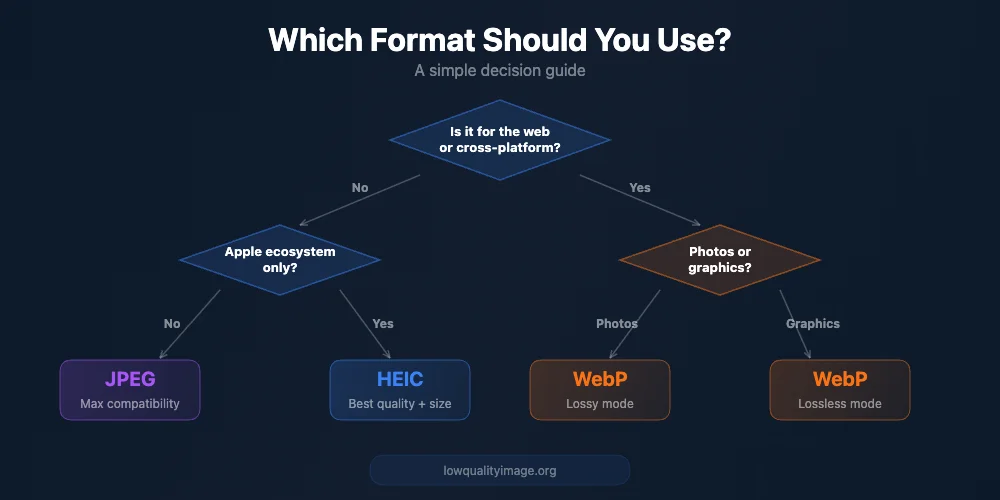
A simple guide to picking the right format for your use case
| Use Case | Best Format | Why |
|---|---|---|
| iPhone photo storage | HEIC | Best compression, 16-bit color, Live Photo support |
| Website images | WebP | 97%+ browser support, fast decoding, great compression |
| E-commerce product photos | WebP | Fast loading, transparency support, universal compatibility |
| Sharing photos cross-platform | WebP or JPEG | HEIC won't open on many devices; WebP or JPEG works everywhere |
| Photo archival | HEIC | Higher color depth, non-destructive edits, smaller files |
| Replacing animated GIFs | WebP | Much smaller than GIF, full browser support |
| Logos & graphics with transparency | WebP | Smaller than PNG, works in lossy and lossless modes |
The truth is, HEIC and WebP aren't really competitors — they serve different roles in the image pipeline. HEIC is a capture and storage format (optimized for cameras and device storage), while WebP is a delivery format (optimized for the web and cross-platform compatibility).
The ideal workflow in 2026: shoot in HEIC on your iPhone, keep HEIC for your photo library, and convert to WebP when you need images for the web.
Further Reading
Ready to Compress Your Images?
Try our free online image compression tool. All processing happens in your browser - fast, private, and easy to use.
Related Articles
Image Upload Failed? 7 Common Causes and Quick Fixes (2026)
A practical troubleshooting guide for image upload errors: unsupported formats, file size limits, dimension mismatches, and browser issues.
How to Make Low Quality Images: 5 Methods Compared
Compare 5 ways to make low quality images: Photoshop, screenshots, online tools, ImageMagick, and browser-based compression. Find the best method for you.
WebP Format Deep Dive: Is Google's Next-Gen Image Format Worth Using in 2026?
Deep dive into WebP: 25-35% smaller files, 97% browser support, lossy & lossless modes. Learn when to use WebP vs JPEG/PNG with real examples.